
Stop wasting time hunting the wrong trees — a screenshot-led field guide to find darkwood and lightwood fast
If you've spent hours chopping at every pine in Whisperfront and came up empty, you're not alone. Resource hunting in Hytale can feel like guesswork: similar-looking forests, ambiguous trunks, and no in-game tags telling you what a tree will drop. This visual guide fixes that. Using targeted screenshots, biome context, and up-to-date 2026 community findings, you'll learn to identify darkwood (cedar) and the key visual cues for lightwood at a glance — and where to prioritize your runs.
Quick summary — what you'll learn (most important first)
- Darkwood = cedar: Look for tall, bluish-green pine silhouettes with visible pinecones in Whisperfront Frontiers (snowy plains — Zone 3).
- Lightwood visual cues: Paler trunks, high-contrast leaves, and sunlit biomes; verify by context rather than trunk color alone.
- Screenshot checklist: how to frame shots so you can ID trees from afar and share with the community.
- Resource-hunting strategy: best times, gear, and quick-farm techniques for 2026 servers and single-player.
Why a photo-first guide matters in 2026
Since late 2025, Hytale has gone through several biome spawn balance patches and the community has produced large screenshot databases and overlay tools. That makes visual identification more effective than ever: you don't need exact coordinates if you can read the scene. Screenshots capture the whole context — ground color, surrounding flora, slope, and lighting — and those cues are what separate cedar from other conifers at a glance.
What changed in the 2025–2026 cycle
- Community map-sharing and screenshot repositories grew dramatically after the 2025 patch that tweaked tree clusters in Whisperfront.
- Server operators started publishing biome seed previews and spawn overlays, making targeted tree runs efficient.
- Players developed a visual taxonomy (color, cone/fruit, trunk pattern, biome soil) that outperforms pure coordinate lists.
How to use this guide
Read the visual keys first, then scan the biome-by-biome gallery where each entry shows an annotated screenshot and practical tips. If you're hunting in multiplayer, use the quick checklist before you log out so your next session is a focused route.
Darkwood identification (the cedar cheat sheet)
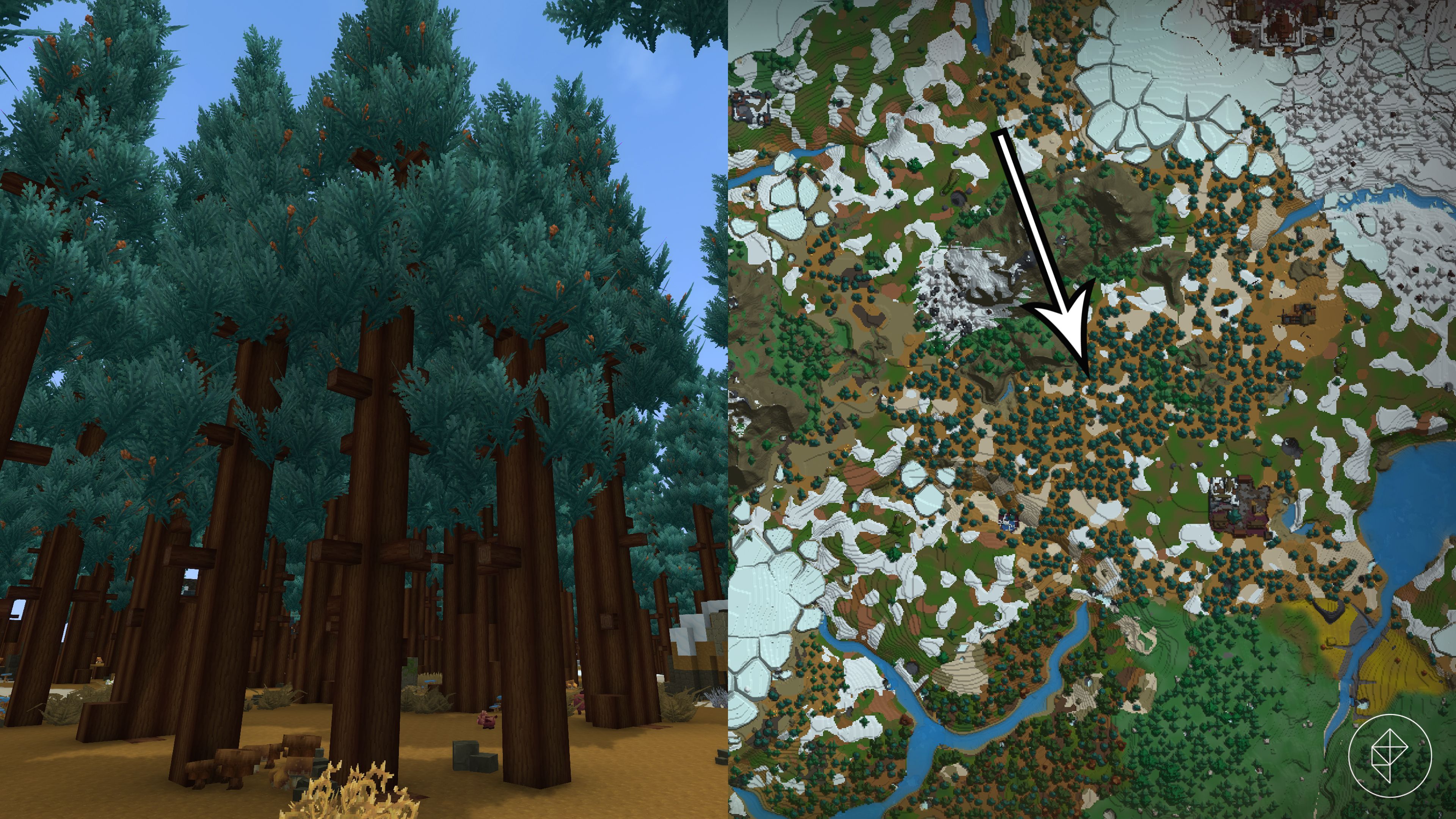
Core fact: As documented in community sources in late 2025 and reaffirmed in early 2026, cedar trees are the primary source of darkwood logs. Cedar forests appear most reliably in Whisperfront Frontiers' colder plains (Zone 3).
Visual cues — what to look for in screenshots
- Leaf color: Bluish-green or teal tints on the needles — cooler hue than most pines.
- Shape: Tall, conical pine profile with denser top canopy and a straighter trunk.
- Pinecones: Small brown cones tucked into foliage; when visible they’re the fastest ID cue.
- Ground context: Brown, slightly frozen-looking plains or mixed redwood/cedar patches with scattered snow in the underbrush.
Field ID workflow (2 minutes)
- Approach from a distance and take a long-shot screenshot (see framing tips below).
- Check leaf hue and cone presence. If bluish-green + cones → high probability of darkwood.
- Confirm by chopping a single test log (any axe works). If dark-barked trunk drops darkwood, mark the location.
Lightwood identification — what the visuals tell you
Lightwood identification is more context-dependent than darkwood. Rather than a single species, lightwood-type logs come from pale-barked trees that spawn in sunlit biomes. In practice, players should prioritize high-exposure, bright-leaf forests and use the same screenshot workflow to confirm.
Visual cues for lightwood candidate trees
- Trunk tone: Paler, often near-white or light beige in base color.
- Leaf contrast: Leaves are high in saturation and tend to catch sunlight — look for bright green or yellow-gold highlights.
- Biome: Lowland meadows, coastal forests, and sun-exposed plateaus are top candidates.
Community tip (2026): "Don’t assume bright trunk = lightwood. Always test with one log and screenshot context before dedicating a full run."
Biome-by-biome visual mapping (screenshots + notes)
Below are the high-ROI biomes to scan first. Each entry includes the visual features you should screenshot and the resource-hunting advice that actually saves time.
Whisperfront Frontiers — Zone 3 (Snowy Plains)
Why go here: Best place for cedar (darkwood). The plains spawn homogeneous cedar forests and mixed cedar/redwood patches.
- Screenshot tip: wide shot at medium zoom, include horizon — you'll capture ground color and tree silhouettes. Pinecones are often visible near the canopy edges.
- Actionable move: mark mixed-edge locations (where cedar meets redwood) — those often have denser cedar stands nearby.
Whisperfront lowlands and coastal belts
Why go here: Primary candidates for lightwood crops. Sunlit exposures and paler tree species show up here more often than in higher-elevation biomes.
- Screenshot tip: capture trunk base + leaves; the base will show bark tone that differentiates lightwood candidates from other pale fungus or lichen-covered trunks.
- Actionable move: do a one-log test cut and keep the screenshot as proof for later farm planning.
Mixed temperate forests
Why go here: diversity of species. These areas are great for building a visual ID library — you'll find cedars mixed with other pines and broadleaf trees.
- Screenshot tip: take cluster shots showing neighboring tree species for comparison — contrasting species make IDs easier later.
- Actionable move: prioritize trees with visible reproductive structures (cones, pods) — those are species-specific cues.
Screenshot best practices — make every image count
If you want to build a reliable visual database or post help requests to community channels, follow this screenshot checklist every time:
- Distance shots: 20–40m shows tree silhouette, canopy, and biome context.
- Trunk close-ups: include 1–2 blocks of ground, trunk base, and the lower bark pattern.
- Canopy details: zoom into foliage to spot cones or flowers — those small details are decisive.
- Lighting & time of day: screenshot in neutral daylight if possible; dawn/dusk shifts color perception.
- Annotate: name files with biome + approximate coordinates + date (e.g., "Whisperfront_Z3_123-78_2026-01-10.jpg").
Practical resource-hunting strategy (actionable steps)
- Before you log in: check recent community maps and server seed overlays (community hubs and official forums saw a spurt of seed-sharing tools in late 2025).
- Plan a route: prioritize contiguous cedar clusters in Zone 3 for darkwood; for lightwood, map lowland sunlit corridors.
- Pack light but effective gear: any quality axe is sufficient for logs; bring light armor for Whisperfront mobs and a bed to reset spawn if needed.
- Test before you farm: chop one trunk to confirm log type and take screenshots for your database.
- Farm sustainably: replant saplings where possible and prefer managed farm plots back at your base for steady supply.
Advanced strategies and 2026 trends
Here are the higher-skill approaches and important community developments to leverage in 2026:
- Community mapping projects: The last 12 months saw multiple crowdsourced map layers that tag cedar clusters — use them to skip low-yield zones.
- Screenshot AI classifiers: Enthusiast teams released early 2026 models that can classify tree species from screenshots. Use these tools to batch-process your screenshots and flag high-probability darkwood stands.
- Route-sharing on Discord/Reddit: Share annotated screenshots with timestamps — communities actively curate 'fresh' runs after each patch.
- Seed-preservation: If you find an exceptional cedar grove, save the world seed (or document it) — seeds with consistent cedar clusters are rare and valuable for creative builds and farms.
Common mistakes and how to avoid them
- Assuming trunk color alone equals resource type — always check cones/fruit and biome context.
- Chopping too many test trees — confirm with one log and your screenshot before committing a long farm run.
- Not using community tools — by 2026, map overlays and classifiers significantly cut hunt time.
Putting it all together: a sample darkwood run (step-by-step)
- Open your community map overlay and identify 3 cedar cluster candidates in Whisperfront Zone 3.
- Create a route that hits them in a loop — conserve travel time by following riverbeds and ridgelines.
- At each cluster: take the long-shot (20–40m), trunk close-up, and canopy close-up screenshots. File and annotate immediately.
- Perform one test chop. If it yields darkwood, clear the cluster and replant saplings where appropriate.
- End route by uploading annotated screenshots to your clan/Discord map channel for future runs.
Example screenshot labels and why they matter
Label format: Biome_Zone_xCoord-yCoord_Date_Type. Example: Whisperfront_Z3_132-045_2026-01-12_CedarTest.jpg. Consistent labels let you build a sortable dataset and quickly compare lighting/seasonal differences.
When to rely on community data — and when to trust your eyes
Community maps get you in the right neighborhood; your screenshots and quick test chops confirm the tree species. Use both: maps narrow the search, visuals confirm the harvest. In 2026, the fastest players combine seed overlays, AI screenshot classifiers, and manual confirmation for the best results.
Final checklist — download & use
- Screenshot template (long shot, trunk close-up, canopy close-up)
- File naming convention (Biome_Zone_coords_date_type)
- One-log test rule (confirm before full farm)
- Replant saplings and mark seed locations
Closing thoughts and next steps
By learning the visual language of Hytale trees — color, cones, trunk tone, and biome context — you cut hours of aimless harvesting and avoid wasted inventory space. In 2026, combine these sight-based skills with community maps and AI tools to make resource runs surgical. Start small: one annotated screenshot and one confirmed test log per run will quickly turn you into the group's go-to darkwood hunter.
Share your screenshots
Got a cedar grove or a tricky lightwood stand? Upload your annotated screenshots to your clan or the Hytale community hub and use the filename format above. If you want, drop them in the official Discord screenshot channel with the tag #tree-id — seasoned players will help verify and add coordinates to shared overlays.
Call to action
Ready to stop guessing and start harvesting? Take one run using the screenshot checklist and upload your images to the community map. If you want a printable one-page cheat sheet, click to download our Hytale Tree ID Quicksheet and join our Discord for live help plotting the fastest darkwood routes. Share one screenshot from your next run with the tag #FromwoodToDarkwood and we’ll feature the best finds in our next guide.
Related Reading
- How to Build a Cozy Watch-Reading Corner: Lighting, Sound, and Comfort Essentials
- Pet Calm Playlists: Best Spotify Alternatives for Soothing Dogs and Cats
- How to Light Your Hijab Flatlays with an RGBIC Smart Lamp
- How to Test a Used Bluetooth Speaker Before You Buy (In-Store or Online)
- Make Your Own LEGO Accessories: 3D Printing Miniatures and Props Safely at Home


